This function shows a Multiple histograms in single chart.
Input variables
| Name | Description | Type |
|---|---|---|
| DATASET | Dataset specifications | Py dictionary |
| key | 'DATASET' = Full dataset | Py dataframe |
| PLOT_SETUP | Specifications of chart | Py dictionary |
| key | 'NAME' = Filename output file | String |
| key | 'WIDTH' = Width figure in centimeters | Float |
| key | 'HEIGHT' = Height figure in centimeters | Float |
| key | 'X AXIS SIZE' = \(x\) font axis size | Float |
| key | 'X AXIS COLOR' = \(x\) axis color | Float |
| key | 'DPI' = The resolution in Dots Per Inch | Integer |
| key | 'EXTENSION' = Extension output file (see matplotlib documentation) | String |
Output variables
The function displays the plot on the screen and saves it to the local folder of the .ipynb / .py file.
Example 1
We use the JOIN_HIST_CHART function to plot a five probability distribuitions.
# Data
N = 10000
DF = pd.DataFrame({'normal': np.random.normal(0, 2, N),
                    'gumbel': np.random.gumbel(0, 2, N),
                    'triangular': np.random.triangular(-1, 0, 1, N),
                    'logistic': np.random.logistic(0, 2, N),
                    'lognormal': np.random.lognormal(0, 1, N)})

# Chart setup
PLOT_SETUP = {
    'NAME': 'figure1-9-1',
    'WIDTH': 20,
    'HEIGHT': 20,
    'X AXIS SIZE': 12,
    'X AXIS COLOR': 'red',
    'DPI':600,
    'EXTENSION':'svg'
}

# Data statement
DATA = {'DATASET': DF}

# Call function
JOIN_HIST_CHART(DATASET = DATA, PLOT_SETUP = PLOT_SETUP)
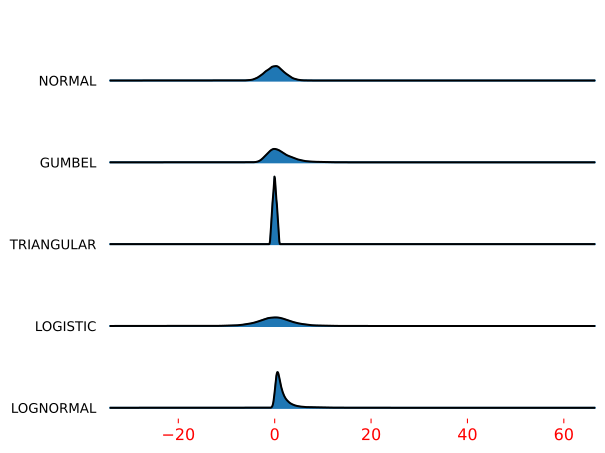
Figure 1. Joy chart example.